


 Find content
 Not Telling
We are building a self-service payment kiosk to allow customers to pay for small amounts without having to approach a traditional counter position (well, at least we are trying to!).
When we first received the barebones kiosk (i.e. everything plugged together but no software), the CashFlow continually displayed the error "Disabled by machine". However, it still would recognise coins and allow us to create a float. It doesn't any more though!
The bill unit will accept the correct notes and rejects any other notes. A test program that was supplied with the bill unit correctly identifies the denomination of the inserted note.
Posts I've Made
In Topic: MEI CF7000 - getting it to work!
17 November 2010 - 02:51 AM
The software in use is an in-house built C# application based on the .NET API from MEI.
Below are a couple of images of the Cashflow device showing the connections.
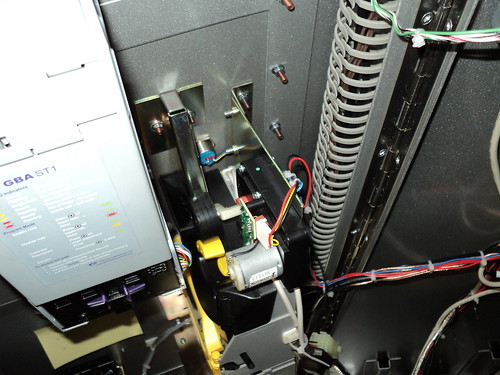
Top down:
Comms & power via the two white/cream cables entering the device roughly in the middle of the photo.
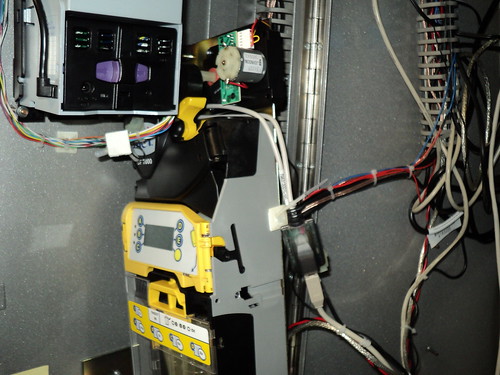
Side:
Comms USB connection in the foreground of the photo - white/cream cable terminated in a black socket with a beige USB cable connected to it.
All the images are at the URL below (larger sizes available): http://www.flickr.co.../56011531@N02/.
I think we have two issues - one with the device itself not accepting coins, and another (probably unrelated) issue with trying to communicate with the device. Is there anyway to determine why it is saying that coins are unknown? I am guessing that at that point, the software on the PC doesn't really matter anyway. Even when trying to add a float by inserting coins throught the device is resulting in the coin unknown message.
Below are a couple of images of the Cashflow device showing the connections.
Top down:
Comms & power via the two white/cream cables entering the device roughly in the middle of the photo.
Side:
Comms USB connection in the foreground of the photo - white/cream cable terminated in a black socket with a beige USB cable connected to it.
All the images are at the URL below (larger sizes available): http://www.flickr.co.../56011531@N02/.
I think we have two issues - one with the device itself not accepting coins, and another (probably unrelated) issue with trying to communicate with the device. Is there anyway to determine why it is saying that coins are unknown? I am guessing that at that point, the software on the PC doesn't really matter anyway. Even when trying to add a float by inserting coins throught the device is resulting in the coin unknown message.

